【Unity】USE_AUTH_EMULATOR not set.
概要
USE_AUTH_EMULATOR not set.
Firebase を導入した Unity プロジェクトで上記のログが出力されることがある。
エミュレータを使ってないのであれば、以下のようなエディタ拡張を
Unity プロジェクトに追加さればログが出力されなくなる。
【Unity】Assertion failed on expression: '!(o->TestHideFlag(Object::kDontSaveInEditor) && (options & kAllowDontSaveObjectsToBePersistent) == 0)'
概要
Assertion failed on expression: '!(o->TestHideFlag(Object::kDontSaveInEditor) && (options & kAllowDontSaveObjectsToBePersistent) == 0)'
UnityEngine.GUIUtility:ProcessEvent (int,intptr,bool&)
Unity 6000.0.64f1 にアップデートしてから
Unity エディタで上記のエラーが発生するようになった。
https://discussions.unity.com/t/unity-6-lts-editor-found-an-error/1546531
Unity 6000.2.0a4 以降なら直っているようだが、
Unity 6000.0.x 系では修正されない?
【Unity】iOS において TMP_InputField のソフトウェアキーボードで「キャンセル」を選ぶと次から入力が反映されなくなる
概要
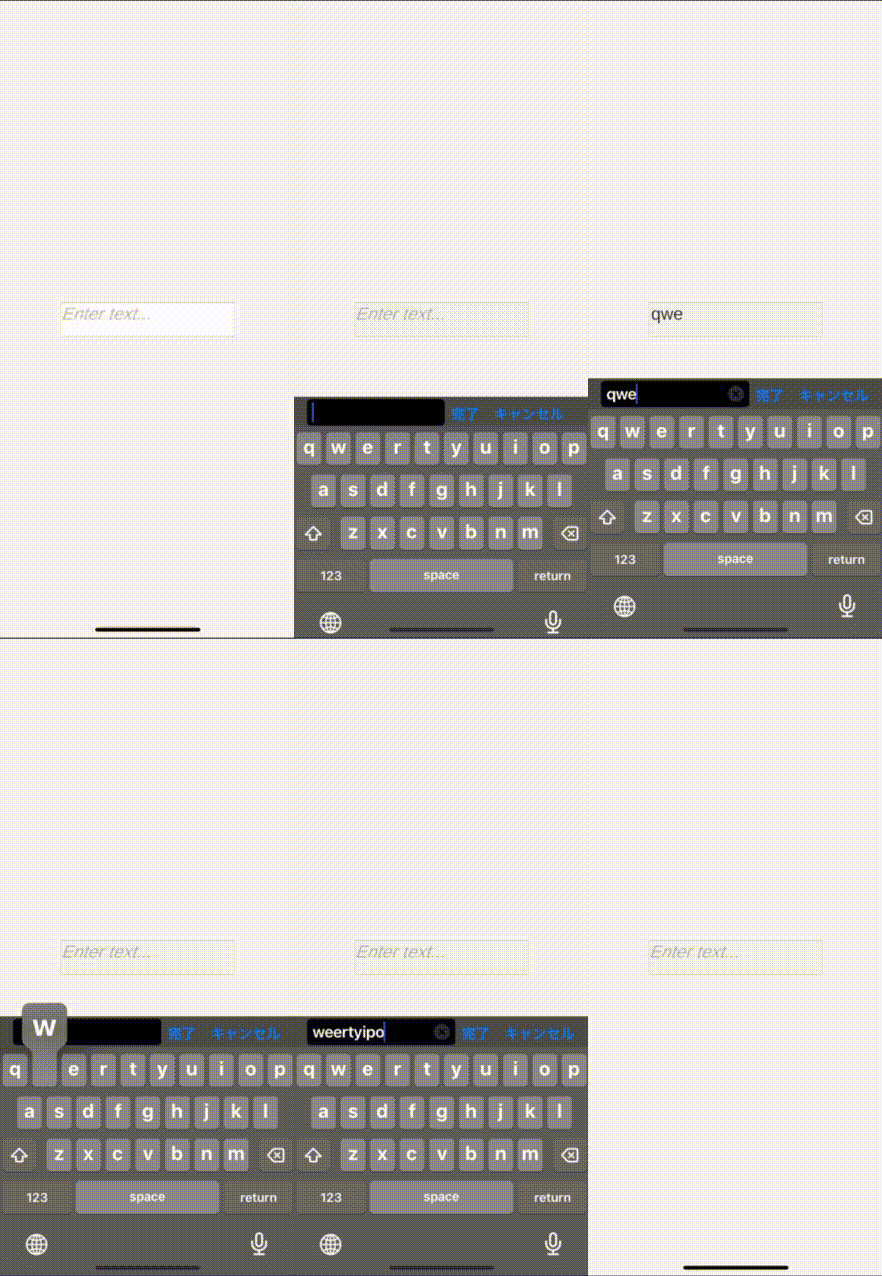
開発環境
- Unity 6000.0.64f1
- Xcode 16.0
- iOS 18.7.2
補足
using TMPro;
using UnityEngine;

public class Example : MonoBehaviour
{
    public TMP_InputField m_inputField;

    private void Awake()
    {
        m_inputField.onTouchScreenKeyboardStatusChanged
            .AddListener( _ => Debug.Log( "hoge" ) );
    }
}
上記のようなコードを書くと、キャンセルを選んだ後に
Debug.Log の出力が止まらなくなる。
【Unity】Sprite Mode のデフォルトを Multiple から Single にするエディタ拡張
概要
上記のスクリプトを Unity プロジェクトに追加すると
Sprite Mode のデフォルトが Multiple から Single になる。
【Unity】アセットの初回インポート時のみ AssetPostprocessor で処理する方法
概要
初回インポート時は importSettingsMissing が true になる。
【Unity】NotSupportedException: Specified method is not supported.
概要
NotSupportedException: Specified method is not supported.
UnityEditor.Search.PropertyTable..ctor (System.String serializationUID, UnityEditor.Search.ITableView tableView) (at /Users/bokken/build/output/unity/unity/Modules/QuickSearch/Editor/Table/ITableView.cs:44)
UnityEditor.Search.DependencyTableView.BuildTable () (at ./Library/PackageCache/com.unity.search.extensions@c804b2750080/Dependencies/DependencyTableView.cs:308)
UnityEditor.Search.DependencyTableView.<Reload>b__15_1 (UnityEditor.Search.SearchContext _) (at ./Library/PackageCache/com.unity.search.extensions@c804b2750080/Dependencies/DependencyTableView.cs:37)
UnityEditor.Search.SearchService.Request (UnityEditor.Search.SearchContext context, System.Action`2[T1,T2] onIncomingItems, System.Action`1[T] onSearchCompleted, UnityEditor.Search.SearchFlags options) (at /Users/bokken/build/output/unity/unity/Modules/QuickSearch/Editor/SearchService.cs:585)
UnityEditor.Search.DependencyTableView.Reload () (at ./Library/PackageCache/com.unity.search.extensions@c804b2750080/Dependencies/DependencyTableView.cs:37)
UnityEditor.Search.DependencyTableView..ctor (UnityEditor.Search.DependencyState state, UnityEditor.Search.IDependencyViewHost host) (at ./Library/PackageCache/com.unity.search.extensions@c804b2750080/Dependencies/DependencyTableView.cs:26)
UnityEditor.Search.DependencyViewer.<BuildViews>b__41_0 (UnityEditor.Search.DependencyState s) (at ./Library/PackageCache/com.unity.search.extensions@c804b2750080/Dependencies/DependencyViewer.cs:290)
System.Linq.Enumerable+SelectListIterator`2[TSource,TResult].ToList () (at <683b21ec9a64413b93b1122ad21a54d3>:0)
System.Linq.Enumerable.ToList[TSource] (System.Collections.Generic.IEnumerable`1[T] source) (at <683b21ec9a64413b93b1122ad21a54d3>:0)
UnityEditor.Search.DependencyViewer.BuildViews (UnityEditor.Search.DependencyViewerState state) (at ./Library/PackageCache/com.unity.search.extensions@c804b2750080/Dependencies/DependencyViewer.cs:290)
UnityEditor.Search.DependencyViewer.SetViewerState (UnityEditor.Search.DependencyViewerState state) (at ./Library/PackageCache/com.unity.search.extensions@c804b2750080/Dependencies/DependencyViewer.cs:333)
UnityEditor.Search.DependencyViewer.PushViewerState (UnityEditor.Search.DependencyViewerState state) (at ./Library/PackageCache/com.unity.search.extensions@c804b2750080/Dependencies/DependencyViewer.cs:271)
UnityEditor.Search.DependencyViewer.OnEnable () (at ./Library/PackageCache/com.unity.search.extensions@c804b2750080/Dependencies/DependencyViewer.cs:100)
UnityEditorInternal.InternalEditorUtility:LoadSerializedFileAndForget_Injected(ManagedSpanWrapper&)
UnityEditorInternal.InternalEditorUtility:LoadSerializedFileAndForget(String)
UnityEditor.EditorWindow:set_maximized(Boolean)
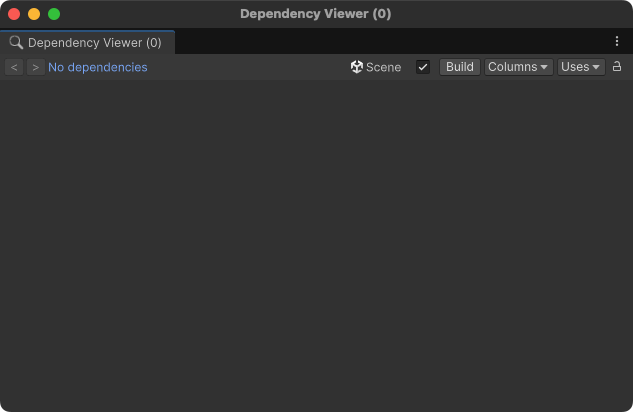
Unity で Dependency Viewer を開いた状態で
Game ウィンドウを最大化した後にもとに戻したら上記の例外が発生した。
Dependency Viewer を閉じたら例外は発生しなくなった。
【Unity】色付きのタイルを描画するシンプルなタイルマップ
ソースコード
Setup メソッドで指定した位置に色を設定できる。
サイズが 128x128 以内ならIndexFormat.UInt16 にしても正常に動作する。
128x128 以上なら IndexFormat.UInt32 にしないと正常に描画されない。
【Unity】Embedded package [XXXX] was found in the directory [YYYY]. Please consider changing the directory name to match the package name.
概要
Embedded package [XXXX] was found in the directory [YYYY].
Please consider changing the directory name to match the package name.
Unity プロジェクトのバージョンを 2022.3 から 6000.0 にアップデートしたら
上記の警告が出力される現象に遭遇した。
パッケージのフォルダ名とパッケージ名が一致していないことが原因だった。
ChatGPT に依頼して上記の Python スクリプトを作成してもらった。
# まずはドライラン
python3 fix_embedded_packages.py --project 【Unity プロジェクトのパス】

# 実行(Unityは閉じておくのが安全)
python3 fix_embedded_packages.py --project 【Unity プロジェクトのパス】--apply
そして、上記のコマンドを実行すると
パッケージのフォルダ名とパッケージ名に一括でリネームしてくれる。
【Unity】[CXX1100] android.ndkVersion is [27.0.12077973] but android.ndkPath /Applications/Unity/Hub/Editor/6000.0.64f1/PlaybackEngines/AndroidPlayer/NDK refers to a different version [27.2.12479018].
概要
Starting a Gradle Daemon, 1 stopped Daemon could not be reused, use --status for details

> Configure project :unityLibrary
Variant 'debug', will keep symbols in binaries for:
  'libunity.so'
  'libil2cpp.so'
  'libmain.so'
Variant 'release', symbols will be stripped from binaries.

[Incubating] Problems report is available at: file:///UnityProject/Library/Bee/Android/Prj/IL2CPP/Gradle/build/reports/problems/problems-report.html

Deprecated Gradle features were used in this build, making it incompatible with Gradle 9.0.

You can use '--warning-mode all' to show the individual deprecation warnings and determine if they come from your own scripts or plugins.

For more on this, please refer to https://docs.gradle.org/8.13/userguide/command_line_interface.html#sec:command_line_warnings in the Gradle documentation.

UnityEditor.BuildPipeline:BuildPlayer (UnityEditor.BuildPlayerOptions)
FAILURE: Build completed with 2 failures.

1: Task failed with an exception.
-----------
* Where:
Script 'UnityProject/Library/Bee/Android/Prj/IL2CPP/Gradle/launcher/setupSymbols.gradle' line: 6

* What went wrong:
A problem occurred evaluating script.
> A problem occurred configuring project ':unityLibrary'.
   > [CXX1100] android.ndkVersion is [27.0.12077973] but android.ndkPath /Applications/Unity/Hub/Editor/6000.0.64f1/PlaybackEngines/AndroidPlayer/NDK refers to a different version [27.2.12479018].

* Try:
> Run with --stacktrace option to get the stack trace.
> Run with --info or --debug option to get more log output.
> Run with --scan to get full insights.
> Get more help at https://help.gradle.org.
==============================================================================

2: Task failed with an exception.
-----------
* What went wrong:
A problem occurred configuring project ':launcher'.
> Android Gradle Plugin: project ':launcher' does not specify `compileSdk` in build.gradle (UnityProject/Library/Bee/Android/Prj/IL2CPP/Gradle/launcher/build.gradle).

* Try:
> Run with --stacktrace option to get the stack trace.
> Run with --info or --debug option to get more log output.
> Run with --scan to get full insights.
> Get more help at https://help.gradle.org.
==============================================================================

BUILD FAILED in 47s

UnityEditor.BuildPipeline:BuildPlayer (UnityEditor.BuildPlayerOptions)
CommandInvokationFailure: Gradle build failed.
/Applications/Unity/Hub/Editor/6000.0.64f1/PlaybackEngines/AndroidPlayer/OpenJDK/bin/java -classpath "/Applications/Unity/Hub/Editor/6000.0.64f1/PlaybackEngines/AndroidPlayer/Tools/gradle/lib/gradle-launcher-8.13.jar" org.gradle.launcher.GradleMain "-Dorg.gradle.jvmargs=-Xmx4096m" "assembleDebug"

Environment Variables:
XPC_SERVICE_NAME = application.com.unity3d.unityhub.56346010.56346016
grpc_cfstream = 0
XPC_FLAGS = 0x0
MallocNanoZone = 0
PATH = /usr/bin:/bin:/usr/sbin:/sbin
SHELL = /bin/zsh
SSH_AUTH_SOCK = /private/tmp/com.apple.launchd.AI97RXpA2T/Listeners
HOME = /Users/baba_s
VIPSHOME = /Users/runner/work/sharp-libvips/sharp-libvips/target
TMPDIR = /var/folders/t8/br6bj9px0fv1dx5bn2bdbygr0000gn/T/
__CFBundleIdentifier = com.unity3d.unityhub
USER = baba_s
__CF_USER_TEXT_ENCODING = 0x1F5:0x1:0xE
LOGNAME = baba_s
JAVA_HOME = /Applications/Unity/Hub/Editor/6000.0.64f1/PlaybackEngines/AndroidPlayer/OpenJDK
ANDROID_NDK_ROOT = /Applications/Unity/Hub/Editor/6000.0.64f1/PlaybackEngines/AndroidPlayer/NDK
COMMAND_MODE = unix2003


stderr[

FAILURE: Build completed with 2 failures.

1: Task failed with an exception.
-----------
* Where:
Script 'UnityProject/Library/Bee/Android/Prj/IL2CPP/Gradle/launcher/setupSymbols.gradle' line: 6

* What went wrong:
A problem occurred evaluating script.
> A problem occurred configuring project ':unityLibrary'.
   > [CXX1100] android.ndkVersion is [27.0.12077973] but android.ndkPath /Applications/Unity/Hub/Editor/6000.0.64f1/PlaybackEngines/AndroidPlayer/NDK refers to a different version [27.2.12479018].

* Try:
> Run with --stacktrace option to get the stack trace.
> Run with --info or --debug option to get more log output.
> Run with --scan to get full insights.
> Get more help at https://help.gradle.org.
==============================================================================

2: Task failed with an exception.
-----------
* What went wrong:
A problem occurred configuring project ':launcher'.
> Android Gradle Plugin: project ':launcher' does not specify `compileSdk` in build.gradle (UnityProject/Library/Bee/Android/Prj/IL2CPP/Gradle/launcher/build.gradle).

* Try:
> Run with --stacktrace option to get the stack trace.
> Run with --info or --debug option to get more log output.
> Run with --scan to get full insights.
> Get more help at https://help.gradle.org.
==============================================================================

BUILD FAILED in 47s
]
stdout[
Starting a Gradle Daemon (subsequent builds will be faster)

> Configure project :unityLibrary
Variant 'debug', will keep symbols in binaries for:
  'libunity.so'
  'libil2cpp.so'
  'libmain.so'
Variant 'release', symbols will be stripped from binaries.

[Incubating] Problems report is available at: file://UnityProject/Library/Bee/Android/Prj/IL2CPP/Gradle/build/reports/problems/problems-report.html

Deprecated Gradle features were used in this build, making it incompatible with Gradle 9.0.

You can use '--warning-mode all' to show the individual deprecation warnings and determine if they come from your own scripts or plugins.

For more on this, please refer to https://docs.gradle.org/8.13/userguide/command_line_interface.html#sec:command_line_warnings in the Gradle documentation.
]
exit code: 1
UnityEditor.Android.Command.WaitForProgramToRun (UnityEditor.Utils.Program p, UnityEditor.Android.Command+WaitingForProcessToExit waitingForProcessToExit, System.String errorMsg) (at /home/bokken/build/output/unity/unity/PlatformDependent/AndroidPlayer/Editor/Managed/Android/Command.cs:221)
UnityEditor.Android.Command.Run (System.Diagnostics.ProcessStartInfo psi, UnityEditor.Android.Command+WaitingForProcessToExit waitingForProcessToExit, System.String errorMsg) (at /home/bokken/build/output/unity/unity/PlatformDependent/AndroidPlayer/Editor/Managed/Android/Command.cs:159)
UnityEditor.Android.Command.Run (System.String command, System.String args, System.String workingdir, UnityEditor.Android.Command+WaitingForProcessToExit waitingForProcessToExit, System.String errorMsg, System.Text.Encoding inputEncoding) (at /home/bokken/build/output/unity/unity/PlatformDependent/AndroidPlayer/Editor/Managed/Android/Command.cs:117)
UnityEditor.Android.AndroidJavaTools.RunJava (System.String args, System.String workingdir, System.Action`1[T] progress, System.String error) (at /home/bokken/build/output/unity/unity/PlatformDependent/AndroidPlayer/Editor/Managed/Android/AndroidJavaTools.cs:115)
UnityEditor.Android.GradleWrapper.Run (UnityEditor.Android.AndroidJavaTools javaTools, Unity.Android.Gradle.AndroidGradle androidGradle, System.String workingdir, System.String task, System.String[] extraArguments, System.Action`1[T] progress) (at /home/bokken/build/output/unity/unity/PlatformDependent/AndroidPlayer/Editor/Managed/Android/Gradle.cs:227)
Rethrow as GradleInvokationException: Gradle build failed
UnityEditor.Android.GradleWrapper.Run (UnityEditor.Android.AndroidJavaTools javaTools, Unity.Android.Gradle.AndroidGradle androidGradle, System.String workingdir, System.String task, System.String[] extraArguments, System.Action`1[T] progress) (at /home/bokken/build/output/unity/unity/PlatformDependent/AndroidPlayer/Editor/Managed/Android/Gradle.cs:232)
UnityEditor.Android.PostProcessor.Tasks.TasksCommon.RunGradleTask (UnityEditor.Android.PostProcessor.PostProcessorContext context, System.String workingDirectory, System.String taskName, System.String[] extraArguments, UnityEditor.Android.PostProcessor.IPostProcessorTask owner, UnityEditor.Android.PostProcessor.ProgressHandler progress) (at /home/bokken/build/output/unity/unity/PlatformDependent/AndroidPlayer/Editor/Managed/PostProcessor/Tasks/TasksCommon.cs:72)
UnityEditor.Android.PostProcessor.Tasks.TasksCommon.RunLauncherGradleTask (UnityEditor.Android.PostProcessor.PostProcessorContext context, System.String taskName, System.String[] extraArguments, UnityEditor.Android.PostProcessor.IPostProcessorTask owner, UnityEditor.Android.PostProcessor.ProgressHandler progress) (at /home/bokken/build/output/unity/unity/PlatformDependent/AndroidPlayer/Editor/Managed/PostProcessor/Tasks/TasksCommon.cs:54)
UnityEditor.Android.PostProcessor.Tasks.BuildGradleProject.Execute (UnityEditor.Android.PostProcessor.PostProcessorContext context) (at /home/bokken/build/output/unity/unity/PlatformDependent/AndroidPlayer/Editor/Managed/PostProcessor/Tasks/BuildGradleProject.cs:57)
UnityEditor.Android.PostProcessor.PostProcessRunner.RunAllTasks (UnityEditor.Android.PostProcessor.PostProcessorContext context) (at /home/bokken/build/output/unity/unity/PlatformDependent/AndroidPlayer/Editor/Managed/PostProcessor/AndroidPostProcessor.cs:112)
UnityEditor.BuildPipeline:BuildPlayer(BuildPlayerOptions)
Unity プロジェクトを 2022.3 から 6000.0 にアップデートして
Android ビルドしたら上記のエラーが発生してビルドに失敗する現象に遭遇した。
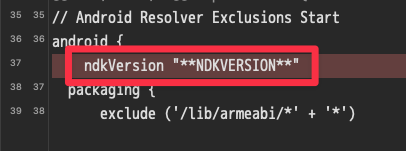
Android ビルド後に mainTemplate.gradle を見てみたら
ndkVersion "**NDKVERSION**" が勝手に削除されていた。
// Android Resolver Exclusions Start
android {
    ndkVersion "**NDKVERSION**"
  packaging {
      exclude ('/lib/armeabi/*' + '*')
      exclude ('/lib/armeabi-v7a/*' + '*')
      exclude ('/lib/mips/*' + '*')
      exclude ('/lib/mips64/*' + '*')
      exclude ('/lib/x86/*' + '*')
      exclude ('/lib/x86_64/*' + '*')
  }
}
// Android Resolver Exclusions End
android {
    namespace "com.unity3d.player"
    ndkPath "**NDKPATH**"
    compileSdk **APIVERSION**
    buildToolsVersion '**BUILDTOOLS**'
もともと上記の場所に ndkVersion "**NDKVERSION**" を記載していたが
// Android Resolver Exclusions Start
android {
  packaging {
      exclude ('/lib/armeabi/*' + '*')
      exclude ('/lib/armeabi-v7a/*' + '*')
      exclude ('/lib/mips/*' + '*')
      exclude ('/lib/mips64/*' + '*')
      exclude ('/lib/x86/*' + '*')
      exclude ('/lib/x86_64/*' + '*')
  }
}
// Android Resolver Exclusions End
android {
    namespace "com.unity3d.player"
    ndkPath "**NDKPATH**"
    ndkVersion "**NDKVERSION**"
    compileSdk **APIVERSION**
    buildToolsVersion '**BUILDTOOLS**'
このように記載場所を変更してから Android ビルドしたら
ndkVersion "**NDKVERSION**" が勝手に削除されなくなり、
Android ビルドに成功するようになった。
参考サイト様
【Chrome】YouTube トップページのサムネイルのサイズを調整する Tampermonkey 用のユーザースクリプト
概要
// ==UserScript==
// @name        YouTube トップページのサムネイルのサイズを調整
// @description YouTube トップページのサムネイルのサイズを調整
// @version     0.1
// @match       https://www.youtube.com/*
// ==/UserScript==

(function () {
    'use strict';

    const css = `
        ytd-rich-item-renderer[rendered-from-rich-grid] {
            --ytd-rich-item-row-usable-width: calc(
                60% - var(--ytd-rich-grid-gutter-margin) * 2
            ) !important;
        }
    `;

    const style = document.createElement('style');
    style.textContent = css;
    document.documentElement.appendChild(style);
})();
60% の部分を好きな数値にすることで任意のサイズに調整可能。
【Unity】CircleCollider2D の Offset と Radius を Sprite に合わせて調整する拡張メソッド
ソースコード
using System.Collections.Generic;
using UnityEngine;

namespace Kogane
{
    public static class CircleCollider2DExtensionMethods
    {
        public static IReadOnlyList<CircleCollider2D> UpdateFromSprite
        (
            this IReadOnlyList<CircleCollider2D> self,
            IReadOnlyList<Sprite>                sprites
        )
        {
            for ( var i = 0; i < self.Count; i++ )
            {
                var circleCollider2D = self[ i ];
                var sprite           = sprites[ i ];

                circleCollider2D.UpdateFromSprite( sprite );
            }

            return self;
        }

        public static CircleCollider2D UpdateFromSprite
        (
            this CircleCollider2D self,
            Sprite                sprite
        )
        {
            var size = sprite.bounds.size;

            self.radius = Mathf.Max( size.x, size.y ) * 0.5f;
            self.offset = sprite.bounds.center;

            return self;
        }
    }
}
【雑記】軽量な Android 端末
概要
| 端末 | 高さ×幅×厚み(mm) | 重量(g) |
|---|---|---|
| Google Pixel 9a | 154.7×73.3×8.9 | 186.0 |
| Google Pixel 8a | 152.1×72.7×8.9 | 189.0 |
| Google Pixel 7a | 152.0×72.9×9.0 | 193.5 |
| Google Pixel 6a | 152.2×71.8×8.9 | 178.0 |
| Galaxy S25 | 146.9×70.5×7.2 | 162.0 |
| Galaxy S24 | 147.0×70.6×7.6 | 167.0 |
| Galaxy S23 | 146.3×70.9×7.6 | 168.0 |
| Galaxy S22 | 146.0×70.6×7.6 | 168.0 |
| Xperia 10 VII | 153.0×72.0×8.3 | 168.0 |
| Xperia 10 VI | 155.0×68.0×8.3 | 164.0 |
| Xperia 10 V | 155.0×68.0×8.3 | 159.0 |
| Xperia 10 IV | 153.0×67.0×8.3 | 161.0 |
【雑記】/usr/local/bin/firebase: line 1: Not: command not found
概要
/usr/local/bin/firebase: line 1: Not: command not found
Firebase の CLI を最新版に更新したら上記のエラーが発生するようになった。
head -n 5 /usr/local/bin/firebase
ターミナルで上記のコマンドを実行したら
Not Found%
と表示される状態だった。
curl -sL https://firebase.tools | upgrade=true bash
上記のコマンドを実行して Firebase の CLI を再インストールしたら直った。
