概要
Starting a Gradle Daemon, 1 stopped Daemon could not be reused, use --status for details

> Configure project :unityLibrary
Variant 'debug', will keep symbols in binaries for:
  'libunity.so'
  'libil2cpp.so'
  'libmain.so'
Variant 'release', symbols will be stripped from binaries.

[Incubating] Problems report is available at: file:///UnityProject/Library/Bee/Android/Prj/IL2CPP/Gradle/build/reports/problems/problems-report.html

Deprecated Gradle features were used in this build, making it incompatible with Gradle 9.0.

You can use '--warning-mode all' to show the individual deprecation warnings and determine if they come from your own scripts or plugins.

For more on this, please refer to https://docs.gradle.org/8.13/userguide/command_line_interface.html#sec:command_line_warnings in the Gradle documentation.

UnityEditor.BuildPipeline:BuildPlayer (UnityEditor.BuildPlayerOptions)
FAILURE: Build completed with 2 failures.

1: Task failed with an exception.
-----------
* Where:
Script 'UnityProject/Library/Bee/Android/Prj/IL2CPP/Gradle/launcher/setupSymbols.gradle' line: 6

* What went wrong:
A problem occurred evaluating script.
> A problem occurred configuring project ':unityLibrary'.
   > [CXX1100] android.ndkVersion is [27.0.12077973] but android.ndkPath /Applications/Unity/Hub/Editor/6000.0.64f1/PlaybackEngines/AndroidPlayer/NDK refers to a different version [27.2.12479018].

* Try:
> Run with --stacktrace option to get the stack trace.
> Run with --info or --debug option to get more log output.
> Run with --scan to get full insights.
> Get more help at https://help.gradle.org.
==============================================================================

2: Task failed with an exception.
-----------
* What went wrong:
A problem occurred configuring project ':launcher'.
> Android Gradle Plugin: project ':launcher' does not specify `compileSdk` in build.gradle (UnityProject/Library/Bee/Android/Prj/IL2CPP/Gradle/launcher/build.gradle).

* Try:
> Run with --stacktrace option to get the stack trace.
> Run with --info or --debug option to get more log output.
> Run with --scan to get full insights.
> Get more help at https://help.gradle.org.
==============================================================================

BUILD FAILED in 47s

UnityEditor.BuildPipeline:BuildPlayer (UnityEditor.BuildPlayerOptions)
CommandInvokationFailure: Gradle build failed.
/Applications/Unity/Hub/Editor/6000.0.64f1/PlaybackEngines/AndroidPlayer/OpenJDK/bin/java -classpath "/Applications/Unity/Hub/Editor/6000.0.64f1/PlaybackEngines/AndroidPlayer/Tools/gradle/lib/gradle-launcher-8.13.jar" org.gradle.launcher.GradleMain "-Dorg.gradle.jvmargs=-Xmx4096m" "assembleDebug"

Environment Variables:
XPC_SERVICE_NAME = application.com.unity3d.unityhub.56346010.56346016
grpc_cfstream = 0
XPC_FLAGS = 0x0
MallocNanoZone = 0
PATH = /usr/bin:/bin:/usr/sbin:/sbin
SHELL = /bin/zsh
SSH_AUTH_SOCK = /private/tmp/com.apple.launchd.AI97RXpA2T/Listeners
HOME = /Users/baba_s
VIPSHOME = /Users/runner/work/sharp-libvips/sharp-libvips/target
TMPDIR = /var/folders/t8/br6bj9px0fv1dx5bn2bdbygr0000gn/T/
__CFBundleIdentifier = com.unity3d.unityhub
USER = baba_s
__CF_USER_TEXT_ENCODING = 0x1F5:0x1:0xE
LOGNAME = baba_s
JAVA_HOME = /Applications/Unity/Hub/Editor/6000.0.64f1/PlaybackEngines/AndroidPlayer/OpenJDK
ANDROID_NDK_ROOT = /Applications/Unity/Hub/Editor/6000.0.64f1/PlaybackEngines/AndroidPlayer/NDK
COMMAND_MODE = unix2003


stderr[

FAILURE: Build completed with 2 failures.

1: Task failed with an exception.
-----------
* Where:
Script 'UnityProject/Library/Bee/Android/Prj/IL2CPP/Gradle/launcher/setupSymbols.gradle' line: 6

* What went wrong:
A problem occurred evaluating script.
> A problem occurred configuring project ':unityLibrary'.
   > [CXX1100] android.ndkVersion is [27.0.12077973] but android.ndkPath /Applications/Unity/Hub/Editor/6000.0.64f1/PlaybackEngines/AndroidPlayer/NDK refers to a different version [27.2.12479018].

* Try:
> Run with --stacktrace option to get the stack trace.
> Run with --info or --debug option to get more log output.
> Run with --scan to get full insights.
> Get more help at https://help.gradle.org.
==============================================================================

2: Task failed with an exception.
-----------
* What went wrong:
A problem occurred configuring project ':launcher'.
> Android Gradle Plugin: project ':launcher' does not specify `compileSdk` in build.gradle (UnityProject/Library/Bee/Android/Prj/IL2CPP/Gradle/launcher/build.gradle).

* Try:
> Run with --stacktrace option to get the stack trace.
> Run with --info or --debug option to get more log output.
> Run with --scan to get full insights.
> Get more help at https://help.gradle.org.
==============================================================================

BUILD FAILED in 47s
]
stdout[
Starting a Gradle Daemon (subsequent builds will be faster)

> Configure project :unityLibrary
Variant 'debug', will keep symbols in binaries for:
  'libunity.so'
  'libil2cpp.so'
  'libmain.so'
Variant 'release', symbols will be stripped from binaries.

[Incubating] Problems report is available at: file://UnityProject/Library/Bee/Android/Prj/IL2CPP/Gradle/build/reports/problems/problems-report.html

Deprecated Gradle features were used in this build, making it incompatible with Gradle 9.0.

You can use '--warning-mode all' to show the individual deprecation warnings and determine if they come from your own scripts or plugins.

For more on this, please refer to https://docs.gradle.org/8.13/userguide/command_line_interface.html#sec:command_line_warnings in the Gradle documentation.
]
exit code: 1
UnityEditor.Android.Command.WaitForProgramToRun (UnityEditor.Utils.Program p, UnityEditor.Android.Command+WaitingForProcessToExit waitingForProcessToExit, System.String errorMsg) (at /home/bokken/build/output/unity/unity/PlatformDependent/AndroidPlayer/Editor/Managed/Android/Command.cs:221)
UnityEditor.Android.Command.Run (System.Diagnostics.ProcessStartInfo psi, UnityEditor.Android.Command+WaitingForProcessToExit waitingForProcessToExit, System.String errorMsg) (at /home/bokken/build/output/unity/unity/PlatformDependent/AndroidPlayer/Editor/Managed/Android/Command.cs:159)
UnityEditor.Android.Command.Run (System.String command, System.String args, System.String workingdir, UnityEditor.Android.Command+WaitingForProcessToExit waitingForProcessToExit, System.String errorMsg, System.Text.Encoding inputEncoding) (at /home/bokken/build/output/unity/unity/PlatformDependent/AndroidPlayer/Editor/Managed/Android/Command.cs:117)
UnityEditor.Android.AndroidJavaTools.RunJava (System.String args, System.String workingdir, System.Action`1[T] progress, System.String error) (at /home/bokken/build/output/unity/unity/PlatformDependent/AndroidPlayer/Editor/Managed/Android/AndroidJavaTools.cs:115)
UnityEditor.Android.GradleWrapper.Run (UnityEditor.Android.AndroidJavaTools javaTools, Unity.Android.Gradle.AndroidGradle androidGradle, System.String workingdir, System.String task, System.String[] extraArguments, System.Action`1[T] progress) (at /home/bokken/build/output/unity/unity/PlatformDependent/AndroidPlayer/Editor/Managed/Android/Gradle.cs:227)
Rethrow as GradleInvokationException: Gradle build failed
UnityEditor.Android.GradleWrapper.Run (UnityEditor.Android.AndroidJavaTools javaTools, Unity.Android.Gradle.AndroidGradle androidGradle, System.String workingdir, System.String task, System.String[] extraArguments, System.Action`1[T] progress) (at /home/bokken/build/output/unity/unity/PlatformDependent/AndroidPlayer/Editor/Managed/Android/Gradle.cs:232)
UnityEditor.Android.PostProcessor.Tasks.TasksCommon.RunGradleTask (UnityEditor.Android.PostProcessor.PostProcessorContext context, System.String workingDirectory, System.String taskName, System.String[] extraArguments, UnityEditor.Android.PostProcessor.IPostProcessorTask owner, UnityEditor.Android.PostProcessor.ProgressHandler progress) (at /home/bokken/build/output/unity/unity/PlatformDependent/AndroidPlayer/Editor/Managed/PostProcessor/Tasks/TasksCommon.cs:72)
UnityEditor.Android.PostProcessor.Tasks.TasksCommon.RunLauncherGradleTask (UnityEditor.Android.PostProcessor.PostProcessorContext context, System.String taskName, System.String[] extraArguments, UnityEditor.Android.PostProcessor.IPostProcessorTask owner, UnityEditor.Android.PostProcessor.ProgressHandler progress) (at /home/bokken/build/output/unity/unity/PlatformDependent/AndroidPlayer/Editor/Managed/PostProcessor/Tasks/TasksCommon.cs:54)
UnityEditor.Android.PostProcessor.Tasks.BuildGradleProject.Execute (UnityEditor.Android.PostProcessor.PostProcessorContext context) (at /home/bokken/build/output/unity/unity/PlatformDependent/AndroidPlayer/Editor/Managed/PostProcessor/Tasks/BuildGradleProject.cs:57)
UnityEditor.Android.PostProcessor.PostProcessRunner.RunAllTasks (UnityEditor.Android.PostProcessor.PostProcessorContext context) (at /home/bokken/build/output/unity/unity/PlatformDependent/AndroidPlayer/Editor/Managed/PostProcessor/AndroidPostProcessor.cs:112)
UnityEditor.BuildPipeline:BuildPlayer(BuildPlayerOptions)
Unity プロジェクトを 2022.3 から 6000.0 にアップデートして
Android ビルドしたら上記のエラーが発生してビルドに失敗する現象に遭遇した。
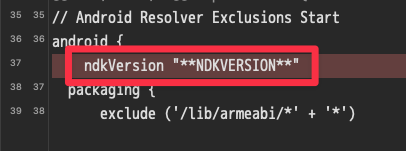
Android ビルド後に mainTemplate.gradle を見てみたら
ndkVersion "**NDKVERSION**" が勝手に削除されていた。
// Android Resolver Exclusions Start
android {
    ndkVersion "**NDKVERSION**"
  packaging {
      exclude ('/lib/armeabi/*' + '*')
      exclude ('/lib/armeabi-v7a/*' + '*')
      exclude ('/lib/mips/*' + '*')
      exclude ('/lib/mips64/*' + '*')
      exclude ('/lib/x86/*' + '*')
      exclude ('/lib/x86_64/*' + '*')
  }
}
// Android Resolver Exclusions End
android {
    namespace "com.unity3d.player"
    ndkPath "**NDKPATH**"
    compileSdk **APIVERSION**
    buildToolsVersion '**BUILDTOOLS**'
もともと上記の場所に ndkVersion "**NDKVERSION**" を記載していたが
// Android Resolver Exclusions Start
android {
  packaging {
      exclude ('/lib/armeabi/*' + '*')
      exclude ('/lib/armeabi-v7a/*' + '*')
      exclude ('/lib/mips/*' + '*')
      exclude ('/lib/mips64/*' + '*')
      exclude ('/lib/x86/*' + '*')
      exclude ('/lib/x86_64/*' + '*')
  }
}
// Android Resolver Exclusions End
android {
    namespace "com.unity3d.player"
    ndkPath "**NDKPATH**"
    ndkVersion "**NDKVERSION**"
    compileSdk **APIVERSION**
    buildToolsVersion '**BUILDTOOLS**'
このように記載場所を変更してから Android ビルドしたら
ndkVersion "**NDKVERSION**" が勝手に削除されなくなり、
Android ビルドに成功するようになった。
