概要
using System.Text.RegularExpressions;

public static class StringExtensions
{
    private const RegexOptions OPTIONS = RegexOptions.IgnoreCase;

    public static string RemoveBBCode( this string self )
    {
        self = Regex.Replace( self, @"\[b\](.*)\[\/b\]"          , "$1", OPTIONS ); // 太字
        self = Regex.Replace( self, @"\[i\](.*)\[\/i\]"          , "$1", OPTIONS ); // 斜体
        self = Regex.Replace( self, @"\[u\](.*)\[\/u\]"          , "$1", OPTIONS ); // 下線付き
        self = Regex.Replace( self, @"\[s\](.*)\[\/s\]"          , "$1", OPTIONS ); // 打ち消し線
        self = Regex.Replace( self, @"\[sub\](.*)\[\/sub\]"      , "$1", OPTIONS ); // 下付き文字
        self = Regex.Replace( self, @"\[sup\](.*)\[\/sup\]"      , "$1", OPTIONS ); // 上付き文字
        self = Regex.Replace( self, @"\[url=.*?\](.*)\[\/url\]"  , "$1", OPTIONS ); // URL
        self = Regex.Replace( self, @"\[[0-9a-f]{6}\](.*)\[\-\]" , "$1", OPTIONS ); // 色
        return self;
    }
}
var str = "[b][i][u][s][sub][sup][url=https://www.google.co.jp/][FF00aa]ピカチュウ[-][/url][/sup][/sub][/s][/u][/i][/b]";
Debug.Log( str.RemoveBBCode() ); // ピカチュウ
NGUIのUIInputで入力欄を作成した場合にBBCode付きで文字列を入力されてしまうと
その文字列を使用している場所で太字や斜体が適用されてしまう不具合に遭遇したため
それを防ぐために作成しました
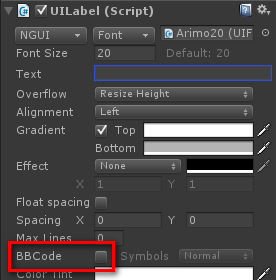
UIInputで入力された文字列を使用しているUILabelをHierarchyビューで選択して
InspectorビューでBBCodeのチェックをオフにすることで
BBCodeを無効化することも可能です
NGUIで使用できるBBCode
| タグ | 説明 |
|---|---|
| [b]ピカチュウ[/b] | 太字 |
| [i]ピカチュウ[/i] | 斜体 |
| [u]ピカチュウ[/u] | 下線付き |
| [s]ピカチュウ[/s] | 打ち消し線 |
| [sub]ピカチュウ[/sub] | 下付き文字 |
| [sup]ピカチュウ[/sup] | 下付き文字 |
| [url=https://www.google.co.jp/]ピカチュウ[/url] | ハイパーリンク |
| [ff0000]ピカチュウ[-] | 色 |
| [b][u]ピカチュウ[/u][/b] | 複合指定(例:太字と下線付き) |
